In the foreign exchange (forex) trading market, various types of orders serve distinct functions. As a trader, it’s essential to understand all types of forex orders, as they determine key aspects of your trading, such as the price at which your order will be executed, how long it can remain active, and when to exit a position, among other important considerations.
In this article, you will learn what a forex order is and find a complete breakdown of all order types used in forex trading. We’ll start with market and pending orders, highlight the key differences between market and limit orders, then move on to the third category: time-in-force orders. Finally, you’ll discover essential forex risk management tools designed to protect your trades.
What Are Forex Orders?
In forex trading, orders are instructions a trader gives to their broker or trading platform to open or close a position under specific conditions. These orders help automate trade execution based on price levels, timing, or risk management preferences.
Forex orders fall into three main categories, each offering different tools to manage trades effectively:
- Market orders:
- Buy Market Order
- Sell Market Order
- Pending orders:
- Sell Limit
- BuyLimit
- Buy Stop
- Sell Stop
- Time-in-Force orders (TIF):
- OCO Order (One Cancels the Other)
- GTC Order (Good Till Cancelled)
- IOC Order (Immediate or Cancel)
- FOK Order (Fill or Kill)
- GTT Order (Good Till Time)
- Bracket Order
- Stop-Limit Order
Now that we’ve reviewed the categories of forex orders, let’s delve into the details of each, starting with the first: market orders.
What Are Market Orders?
A market order is an order or request made by an investor to a broker to buy or sell a security immediately at the best available current market price. It is the simplest and fastest type of order.
The key characteristic of a market order is that it guarantees execution but does not guarantee the price. It is the default choice for investors most of the time for fast execution, as the market order tends to be completed instantly at a very close price to the last price posted by the trader.
What is a Buy Market Order?
A Buy order is an instruction from a trader to a broker to purchase a currency pair at the current market price (ask) and execute instantly.
One common question beginners ask is: with so many types of forex orders, why use a buy market order? Let’s break it down in the next section.
Why Use Buy Market Orders?
Traders use a buy order when they believe the price will go up and they want to enter immediately without waiting for a specific price. So their top priority is to get into position immediately.
Choosing to use buy market orders often, when you’re trading high-liquid markets, where the price differences between the bid and ask are very small. Also, if you’re capitalizing on urgent market news, you will need to use a buy market order for instant execution without delay.
For example:
Let’s assume that we place a buy market order on EUR/USD and the current price is 1.1577, and the price goes up, and we exit at 1.1600, which means that we capture a gain of 23 pips. In this case, we enter the market at the current available price.
How Do Buy Orders Work?
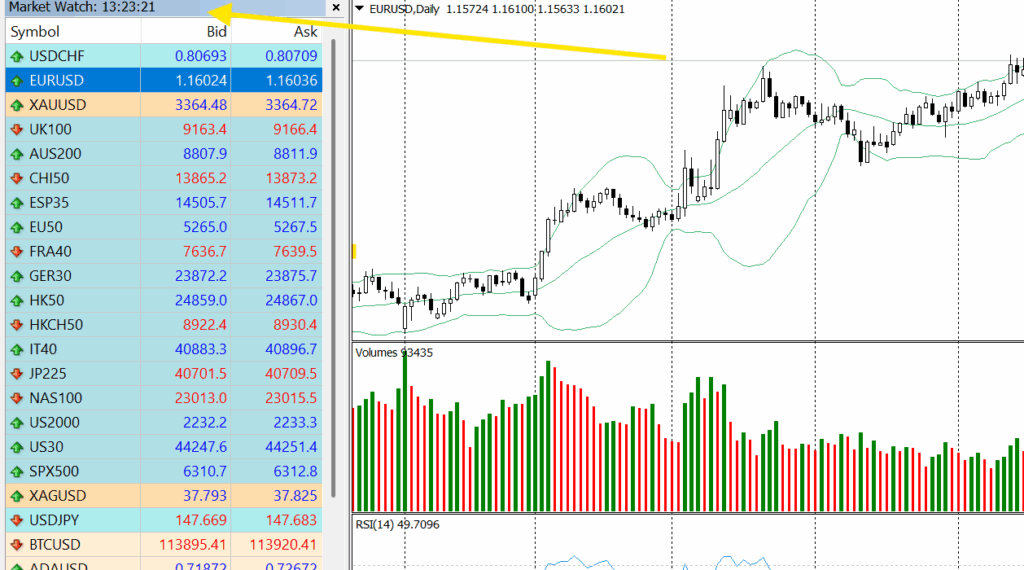
- Open the Trading Platform (MT4/MT5):
Download your MetaTrader 4 or 5 and log into your live or demo trading account. Make sure your platform is connected to the internet and synced with your broker’s server for live market data.
- Select the Trading Instrument:
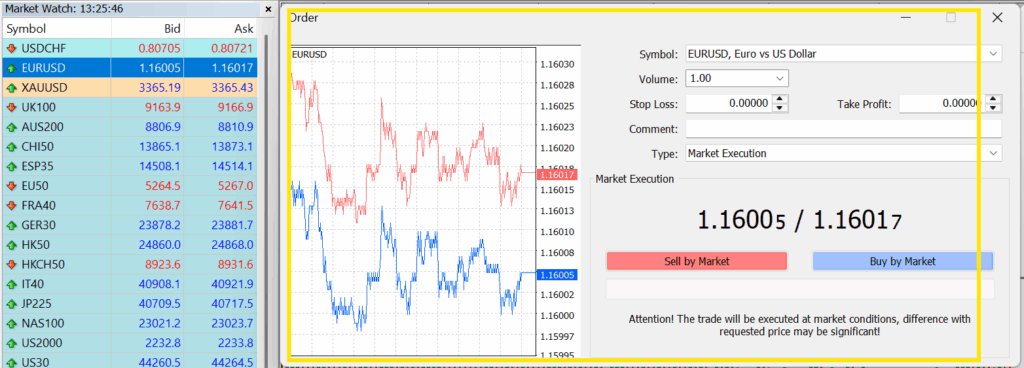
Go to the market watch window, right-click on your desired currency pair.
For example:
EUR/USD, then the order execution window for the selected currency pair will be opened as shown in the following snapshot.
- Choose “Market Execution” as Order Type:
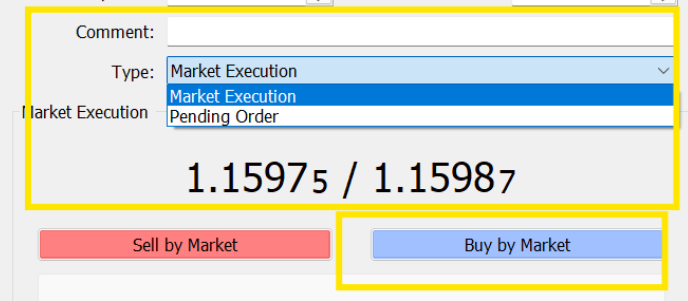
In the order window, under Order Type, make sure to select “Market Execution” (this is the default option in most cases). This enables you to enter a buy market order, which means your trade will be executed immediately at the best available price.

- Set the Lot Size:
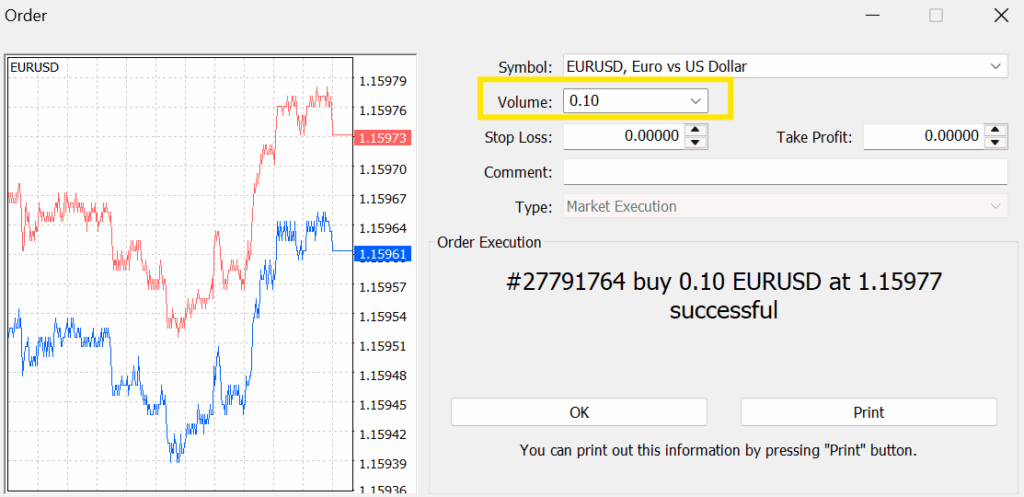
Enter the volume (lot size) you want to trade.
For example:
0.10 means a mini lot, equivalent to 10,000 units of the base currency. Choose your lot size based on your account balance and risk management strategy.
- Click on “Buy by Market:
Click the “Buy by Market” button to place your buy order instantly. The order will be executed at the current Ask price, which is the lowest price a seller is willing to accept.
- Trade Confirmation:
A confirmation box or message will appear, showing your entry price, volume, and order number. You can now see your open position in the Trade tab of the Terminal window.
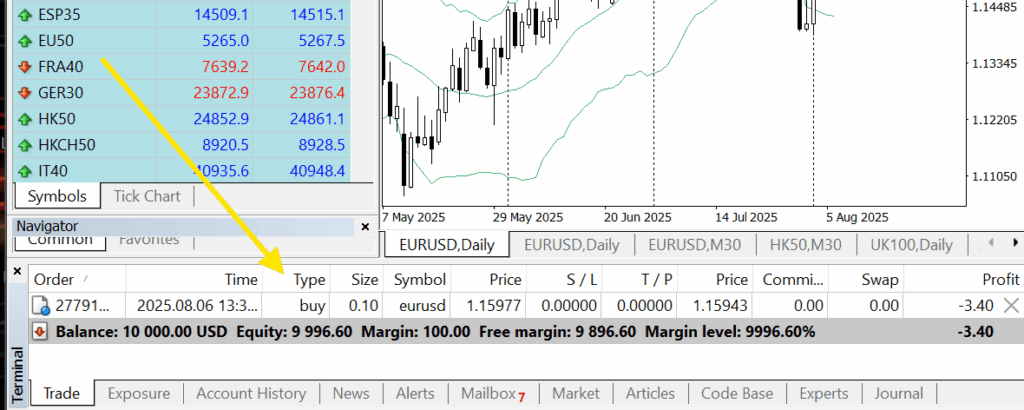
Now that you’ve learned how buy market orders work, let’s move on to understanding sell market orders.
What Is A Sell Market Order?
A sell order is an instruction to sell a currency pair at the current market price (bid). It executes instantly and is the fastest way to sell at the market price.
Why Use Market Sell Orders?
This type of order ensures instant execution at the best available bid price in the market, making it ideal in fast-moving or volatile conditions. Find below the key reasons that trigger a trader to use a market sell order:
- When the market is turning against a position, traders prefer to sell instantly to limit further losses.
- Traders following momentum or trend-reversal strategies might sell quickly to capitalize on a breakdown or reversal.
- During unexpected economic events, traders may use market sell orders to react quickly before prices move further.
As clarified, it’s not just a sell order; it can be used quickly to safeguard other open trades or capitalize on unexpected economic news.
How Do Sell Orders Work?
You place a market sell order with your broker, and it is automatically executed at the highest available bid price from a buyer. You don’t specify a price, only the lot size you want to sell.
The steps are the same as those mentioned above for the buy market order; simply click “Sell by Market” on your platform to immediately enter a short position.
- Choose “Market Execution” as Order Type.
- Set the Lot Size: Choose your lot size based on your account balance and risk management strategy.
- Click on “Sell by Market” to place your sell order instantly.
- Trade Confirmation: A confirmation box or message will appear, showing your entry price, volume, and order number. You can now see your open position in the Trade tab of the Terminal window.
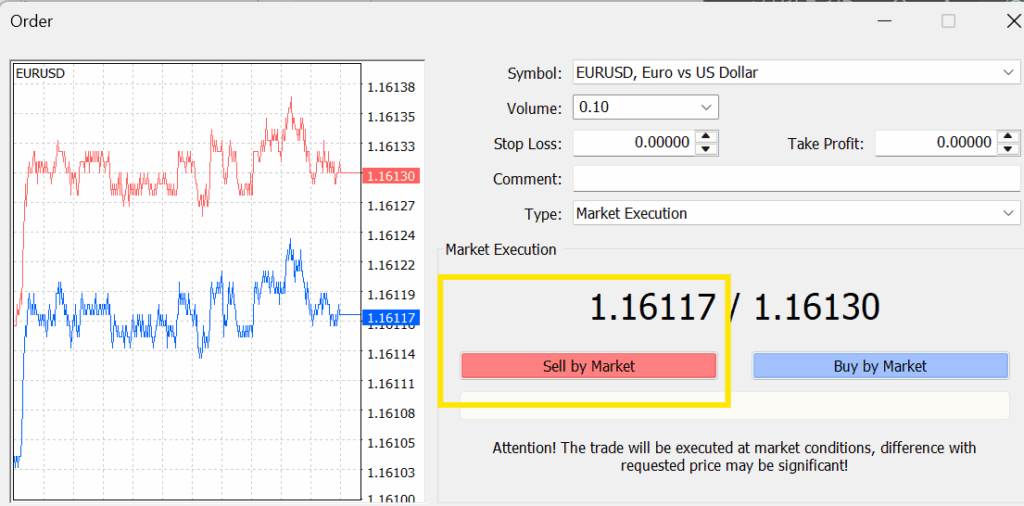
Now that you’ve learned what market orders are and how they work, let’s shift our focus to the second type of forex orders, pending orders, and understand what they are.
What Are Pending Orders?
In forex trading, pending orders are instructions you give to your broker to execute a trade at a later time, when the market reaches a specific price level you’ve chosen. Unlike market orders, which are executed instantly at the current price, pending orders allow you to plan your trades in advance, making them ideal for traders who want to automate entries without constant monitoring.
There are four main types of pending orders, and each serves a unique trading scenario:
- Sell Limit
- Buy Limit
- Buy Stop
- Sell Stop
Each of these will be explained in detail in the following sections, including how and why to use them in your trading strategy.
What Is A Sell Limit Order?
A sell limit order is an order to sell a security at a specific price or higher. Unlike a market order, which is executed immediately at the best available price, a limit order guarantees the price but does not guarantee execution.
Why Use A Sell Limit Order?
- A sell limit order allows you to set a specific price above the current market level. This helps lock in gains when the price reaches your target without selling too early.
- It protects you from executing a sale at a lower-than-acceptable price, especially during sudden market drops.
- Instead of constantly watching the market, you can set your target and let the platform execute the order automatically once the price is triggered.
- If you’re willing to wait for a better price and believe the market will reach that level, a sell limit order lets you sell on your terms.
How Do Sell Limit Orders Work?
You set a limit price for the asset you want to sell. Your order will only be executed if the market price rises to your specified limit price or higher. The order remains active until it’s filled, canceled, or expired. Find below how to place a sell limit order on MT4/MT5 step by step:
- Open the order window in the MT4:
By right-clicking on the currency pair you want from the market watch list, and choosing a new order.
- Set the order type:
Change type from Market Execution to “Pending Order”, then, in the Pending Order Type dropdown, select “Sell Limit” like this :

- Enter Trade Details:
- Volume: Set your lot size.
- Price: Enter the limit price above the current market price where you want the sell order to trigger.
- Stop Loss & Take Profit: (Optional) Set your risk management levels.
- Expiry: (Optional) Choose an expiry time if you don’t want the order to remain open indefinitely.
- Place the Order:
Click “Place” to confirm the Sell Limit Order.
- Check the Trade Tab:
Your order will now appear in the “Trade” tab at the bottom of MT4 as a pending order, waiting for price activation.
What Is A Buy Limit Order?
A buy limit order is an instruction to purchase a security at a specific price or lower. It ensures you don’t pay higher than your set price, but it doesn’t guarantee execution. The market price must reach your limit for the order to be filled.
Why Use A Buy Limit Order?
- To guarantee the executed buying price: A buy limit order ensures it is executed at or below your selected price.
- To buy below the current market price: This order type lets you place a buy order below the current market level, aiming to enter the market if the price drops to your preferred entry point.
- Many traders use buy limit orders to take advantage of price dips, setting their orders at lower levels to catch pullbacks without constantly watching the market.
- It supports disciplined trading by allowing you to set and forget your price target, helping you avoid emotional or impulsive decisions.
Now that you understand why traders choose to use buy limit orders, let’s see how to place one on the MT4 trading platform.
How Do Buy Limit Orders Work?
As we mentioned above in the steps for placing a Sell Limit Order, the process is nearly identical for a Buy Limit Order, with only a few key differences:
- Choose the currency pair
From the Market Watch panel, right-click on the instrument you want to trade and select “New Order.”
- Change order type to ‘Pending Order’
In the order window, set the “Type” to Pending Order instead of Market Execution.
- Select ‘Buy Limit’ from the dropdown
In the “Pending Order” type menu, choose Buy Limit.
- Set your entry price (limit price)
Enter the price below the current market price where you want the buy order to be executed.
Choose the lot size and, optionally, set stop loss/take profit and expiration time.
- Click ‘Place’
Click “Place” to activate the Buy Limit order.
Now that we’ve clarified both Sell Limit and Buy Limit orders, it’s important to understand the remaining types of pending orders. So, let’s shift our focus to: What is a Buy Stop order?
What Is A Buy Stop Order?
A buy stop order is a type of pending order to buy at a price above the current market price, used to enter a long position on a breakout resistance. When the market reaches the price at which you want to enter, the buy stop becomes a market order and is filled at the best available price.
Why Use A Buy Stop Order?
- It can be used as an alert to enter when the price breaks resistance. You can use buy stop orders to buy a security once its price breaks above a specific resistance level, confirming upward momentum.
- You can manage risks in short positions by using a buy stop order for position hedging. A buy stop order can act as a protective stop-loss for short positions, triggering a buy if the market moves against the trade.
- Instead of monitoring the market for a breakout, you can set buy stop orders to enter the trade if a certain price is reached automatically.
- It helps avoid emotional decisions by automating entries only when momentum confirms a bullish move.
With these benefits in mind, let’s see how buy stop orders work.
How Do Buy Stop Orders Work?
A buy stop order is placed above the current market price. It is triggered only if the price rises to or above your specified level and is often used when traders expect a breakout above a resistance level.
- On the MT4 trading platform, select “Pending Order” from the order type dropdown.
- Choose “Buy Stop”
- Enter trade details:
- Price: Enter the price above the current market level at which you want the order to be triggered.
- Volume: Set your lot size.
- Stop Loss & Take Profit: (Optional) Set your risk management levels.
- Expiry: (Optional) Choose an expiry time if you don’t want the order to remain open indefinitely
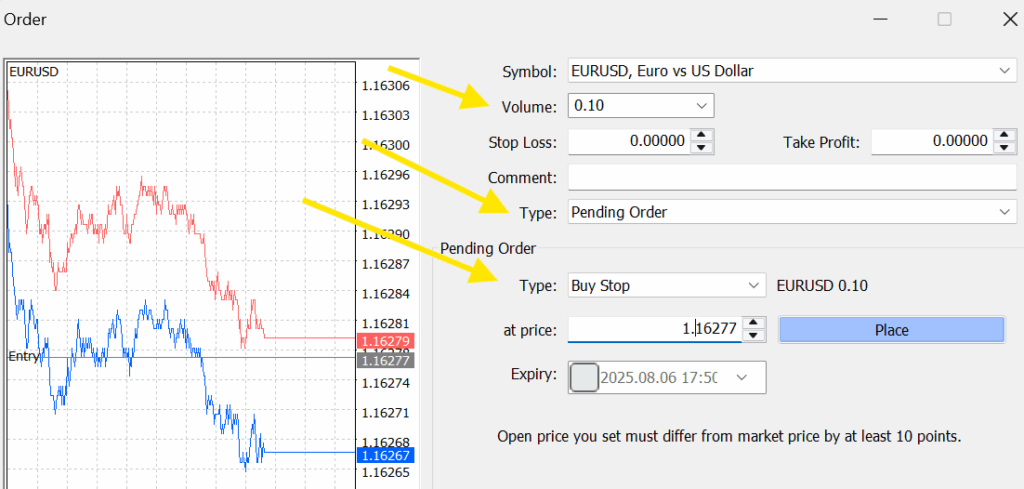
Now that you understand how to place a buy stop order, let’s move on to its opposite and the final type of pending order: the sell stop order.
What Is A Sell Stop Order?
A Sell Stop order is a pending order to sell an instrument at a price below the current market price. When the market reaches that level, the Sell Stop becomes a market order and is filled at the best available price. Used to enter a short position on a breakdown (price falls through a support level).
Why Use A Sell Stop Order?
- Breakout entry to go short: You anticipate a downward move if the price drops below a support level. The Sell Stop allows you to enter the short position immediately on the breakout, not on a retrace.
- Hedge/stop loss for a long position: If you are long and wish to limit your loss when the price declines, you can place a Sell Stop below the current price to initiate the position if signs of weakness appear automatically.
- Automated risk management: Set a predefined price at which you will trade the downside without needing to monitor the screen.
Key Differences | Limit Orders vs Market Orders:
| Feature | Market Order | Pending/limit Order |
| Execution Speed | Immediately as fast as possible. | Not guaranteed; depends on the market reaching your specified price. |
| Price Guarantee | No. The order is filled at the best available price at the moment of execution, which may fluctuate. | Yes. The order is executed at your specified price or a better price. |
| Execution Guarantee | Yes. The order is guaranteed to be filled. | No. There is no guarantee your order will be filled if the market never reaches your specified price. |
| Primary Goal / Purpose | Prioritizes immediate execution. Ideal for urgent or time-sensitive trades. | Prioritizes price control. Ideal for setting a target price for entry or exit. |
| Risk Involved | You may get an unfavorable price, especially with low-volume or volatile securities. | You may miss an opportunity to trade if the market moves away from your specified price. |
| Order Placement | Placed at the current best available price. You only specify the size of lots. | Placed at a specific price you choose (or a better price). |
| Best Use Cases | Exiting a losing position quickly, entering a trade based on breaking news, or trading highly liquid stocks. | Locking in a profit target, buying a security at a desired “dip” price, or selling at a target price. |
Now that we’ve covered everything you need to know about market and pending orders, let’s shift our focus to advanced forex orders and understand what time-in-force orders are, to master all types of forex orders.
What Are Time In Force (TIF) Orders?
Time-in-force (TIF) orders indicate how long an order remains active in the market before it is executed or expires. This type of instruction is crucial for managing trade execution based on time sensitivity, market conditions, and trading strategy.
These orders are not trade types themselves, but conditions attached to trade orders, mainly used for more control, automation, and precision in execution. These orders often require the use of Expert Advisors (EAs) to automate the executions and link orders to each other.
OCO Order (One Cancels the Other):
A pair of orders where if one is executed, the other is automatically canceled.
Use Case:
- Useful when trading breakouts or reversals, e.g., placing a buy stop above resistance and a sell stop below support.
- This type requires using EA (Expert Advisor) because it involves more than just placing two pending orders. It’s about linking them together so that when one of them is triggered, the other is automatically canceled.
GTC Order (Good Till Cancelled):
Stays active until manually canceled by the trader or fully executed. It can be used with various types of orders, such as limit orders and stop orders, allowing you to execute your trading strategy over a longer time frame without constantly monitoring the market.
Use Case:
- Ideal when you want your order to remain open beyond a single trading session.
- No EA is required to use the CTC order. Both MT4/MT5 support it. When you place a pending order (Buy Limit, Sell Limit, Buy Stop, or Sell Stop), it remains active indefinitely until it’s triggered (executed), you manually cancel it, or it expires if you’ve set an expiration time.
IOC Order (Immediate or Cancel):
A time-in-force instruction that demands the order be executed immediately. Any portion of the order that cannot be filled at the time of entry is immediately and automatically canceled.
Use Case:
- Best for fast-moving markets where partial execution is acceptable, but waiting is not.
- It requires a custom EA (Expert Advisor) to automate this condition.
FOK Order (Fill or Kill):
An extremely strict time-in-force instruction that must be filled entirely and immediately, or it’s canceled. No partial fills allowed.
Use Case:
- Useful for traders who need full execution at a specific price and can’t accept less.
- It needs EA, which is not supported by MT4/MT5 by default.
GTT Order (Good Till Time):
Similar to GTC, but the order will automatically expire at a specific date and time if not filled.
Use Case:
- Ideal for strategies tied to time-based opportunities or news events.
- But it needs EA, which is not natively supported on MT4/MT5.
Bracket Order:
An automated risk management tool that places two conditional orders around an existing position. It typically includes a stop-loss order (to limit losses) and a take-profit order (to secure gains), which are both triggered automatically. Once one of the secondary orders is triggered, the other is canceled.
Use Case:
- Excellent for setting automatic exits with controlled risk and reward parameters.
- Requires EA or third-party tools for proper bracket logic.
Stop-Limit Order:
A hybrid order that combines a stop order with a limit order. Once the stop price is reached, it triggers a limit order to buy or sell, rather than a market order. This allows you to control the price you get, but with the risk that the limit order may not be filled.
Use Case:
- Helps avoid slippage, allowing you to define the minimum price you’re willing to accept after a trigger level is reached.
- Not built into MT4/MT5; needs a custom EA or plugin.
Now that we’ve finished exploring all types of forex orders and briefly covered everything you need to know, you’re well-equipped to master using them in your trading journey. Let’s explore the key risk management tools that go hand in hand with forex orders and are essential for a successful trading journey.
What Are Risk Management Tools?
Effective risk management is a vital part of using forex orders wisely. Here are three essential tools every trader should understand:
- Stop-Loss: An order that automatically closes your position when the market moves against you by a specified amount. It helps limit potential losses.
- Take-Profit: An order that takes in profits by closing your position when the price reaches a pre-set favorable level.
- Trailing Stop-Loss: A dynamic stop-loss that adjusts with market movements, allowing profits to run while still protecting against downside risk.